


CommSecIRESS support - Unable to login, goes to a blue screen (user@company)
If you come across a blue login screen (as shown below) when you are trying to login to CommSecIRESS this is most likely to be caused by outdated temporary files and cookies. Instructions for clearing these files, depending on your operating system, are provided below.
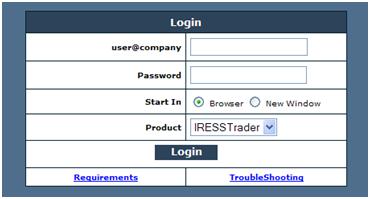
- Open Internet Explorer
- Click the Tools menu (or 'alt+T') and select Internet Options
- Click the Delete button in Browsing History
- Select Temporary Internet Files and Cookies
- Click Delete, then close Internet Explorer and restart the browser
- Click Settings in the toolbar, then select Tools and Clear browsing data
- Ensure Obliterate the following items from is set to the beginning of time
- Enable Empty the cache and Delete cookies and other site data
- Click Clear browsing data, then close Google Chrome and restart the browser
- Open Safari
- Click the Safari menu and select Reset Safari
- Select Empty the cache, Remove all cookies and Close all Safari windows
- Click Reset
If you are still experiencing difficulties, please call CommSec on 13 15 19 or +61 2 9115 1417 if calling from outside Australia (Monday to Friday, 8am to 7pm, Sydney time) and a Equities Associate will be able to help you.